
Check-in 流程好花時間!用這 10 個活動 App 報到快速又簡潔
With the pandemic raging over these past few years, people have become accustomed to joining online events with just a few clicks. However, as the pandemic gradually eases, physical events are also slowly making a comeback. If your physical event still requires cumbersome check-in procedures, it will not leave a good first impression on attendees.
If you haven’t figured out how to simplify check-in procedures for your event, we’ve compiled 10 of the best event management apps of the year, so you can prepare before your post-pandemic physical events begin.
As an event planning team, are you ready to host your first post-pandemic physical event?
Click here to see the most recommended event management apps for 2022
Event Check-in App Comparison Table
App Name
Pricing
Event Scale
Best For
Supported Languages
Eventbrite
-
Free version available
-
Custom pricing
-
Large
-
Medium
-
Small
Best For: Event teams needing diverse solutions.
-
English
-
French
-
German
OnArrival@Cvent
-
Custom pricing
-
Large
-
Medium
Best For: - Startups - SMBs - Institutions - Large enterprises
- English
Certain Arrive
-
Free version available
-
Annual plan: Starting at $99/year (approx. 3,000 TWD)
-
Large
-
Medium
Best For: Free events or events with potentially large attendee numbers. - Startups - SMBs - Institutions - Large enterprises
- English
Glistrr
-
Free version available
-
Monthly plan: Starting at $99/month (approx. 3,000 TWD)
-
Small
-
Medium
Best For: Organizing teams managing events with 500–10,000 attendees. - Startups - SMBs - Institutions - Large enterprises
-
English
-
Spanish
Splash
-
Free version available
-
Custom pricing
-
Large
-
Medium
-
Small
Best For: - Startups - SMBs - Institutions - Large enterprises
- English
Zkipster
-
Monthly plan: Starting at $199/month (approx. 6,000 TWD)
-
Large
-
Medium
-
Small
Best For: Events with potential cross-domain locations; and ticketing-free online events.
- English
Attendium
-
Free version available
-
Large
-
Medium
Best For: Teams managing multiple events simultaneously.
- English
Guest Manager
-
Monthly plan: Starting at $30/month (approx. 900 TWD)
-
Large
-
Medium
Best For: Teams with higher on-site ticketing management needs.
-
English
-
Swedish
Sched
-
Monthly plan: Starting at $30/month (approx. 900 TWD)
-
Medium
-
Small
Best For: Events with daily ticket sales or bundled ticket packages.
- English
EventX
-
Free version available
-
Custom pricing
-
Large
-
Medium
-
Small
Best For: Teams needing comprehensive event management solutions, including but not limited to ticketing management, attendee management, multi-event management, and more.
English Traditional Chinese Simplified Chinese Japanese Korean
Click here to see the most recommended event management apps for 2022
10. Eventbrite
( Available on iOS and Android )
Key Features:
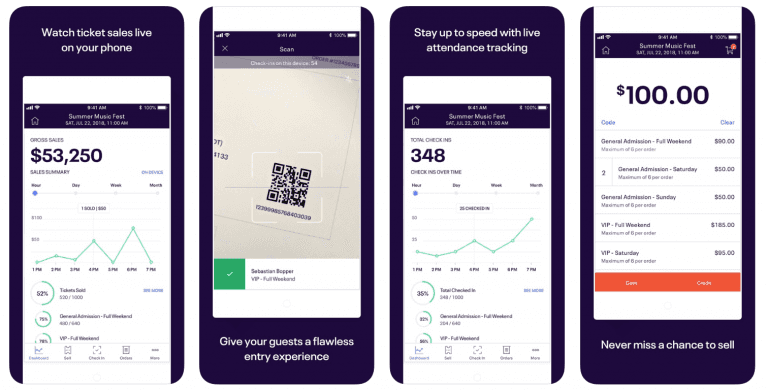
If you want to handle ticketing via your phone, Eventbrite is a great choice.
With the Eventbrite App, you can collect payments and verify tickets, manage ticket sales, and track event progress — all from your phone.
Beyond ticketing management, Eventbrite is also a multi-solution event management app where you can plan events, run marketing campaigns, and collect and analyze data.
User Feedback:
Pros: “My favorite Eventbrite feature is its ability to track audience sources, showing which platforms deliver better promotional results. Plus, being able to use a phone as an on-site ticket validation device is incredibly convenient.” Cons: “Eventbrite’s features are too streamlined, with limited customization options.” “When building an event page, it’s hard to figure out how to use different features. I wish Eventbrite provided more tutorials or support.”
Pricing:
According to software review site getapp, Eventbrite only charges when you sell tickets through the platform. Pricing is as follows:
Basic: 2% + $0.79 per ticket Professional: 3.5% + $1.59 per ticket Premium: Contact Eventbrite for custom pricing Additionally, when hosting free events, you can use Eventbrite’s features at no cost.
Ratings:
On software review site getapp, Eventbrite received a 4.6/5 star rating, with over 95% of users having a positive experience and willing to recommend it to others.
Value ★★★★⬖ 4.5 Features: ★★★★⬖ 4.5 Ease of Use: ★★★★⬖ 4.6 Support: ★★★★☆ 4.3
9. OnArrival

( Available on iOS and Android )
Key Features:
Developed by Cvent, OnArrival is an app dedicated to ticketing and check-in management.
Tasks such as event check-in, attendee badge printing, and credit card payments can all be handled through OnArrival.
Notably, OnArrival also offers self-service kiosk functionality, freeing up event staff to focus on other tasks.
User Feedback:
Pros: “You can tell that Cvent is serious about maintaining the app and developing new features. OnArrival makes it easy to plan new events using preset templates; the event report export feature is also very useful.” Cons: “Sometimes the exported event reports have discrepancies — for instance, registered attendees may not appear on the list.”
Pricing:
According to business site fitsmallbusiness, Cvent’s pricing depends on the number, scale, and average ticket price of events your team holds annually. Additionally, each attendee checked in through OnArrival incurs a 2.5% + $1.50 fee; credit card payments incur an additional 3% processing fee.
Ratings:
On GetApp, Cvent received a 4.4/5 star rating, with over 90% of users having a positive experience and willing to recommend it to others.
Value: ★★★★☆ 4.1 Features: ★★★★☆ 4.0 Ease of Use: ★★★★☆ 4.0 Support: ★★★★⬖ 4.5
8. Certain

( Available on iOS and Android )
Key Features:
The Certain Event Check-In App is an application designed to improve event check-in efficiency and track attendance.
Certain also offers a special “VIP Notification” feature — when a designated VIP guest checks in, Certain will notify you immediately. Additionally, if you encounter any issues using Certain, you can reach out to the support team for assistance.
User Feedback:
Pros: “Certain’s event registration and on-site attendance management features are very useful.” Cons: “When processing large volumes of data, manual intervention may be required.”
Pricing:
Certain offers various pricing tiers, from free to plans up to $4,999/year. The free tier supports events with up to 50 attendees.
First-time Certain users receive additional free trial features. For more plan details, visit the Certain Arrive website.
Ratings:
On review site g2, Certain Arrive received a 4/5 star rating, with 90% of users having a positive experience and willing to recommend it to others.
Value: ★★★★☆ 4.0 Features: ★★★★☆ 4.0 Ease of Use: ★★★★☆ 4.0 Support: ★★★★☆ 4.0
7. Glistrr
( Available on iOS and Android )
Key Features:
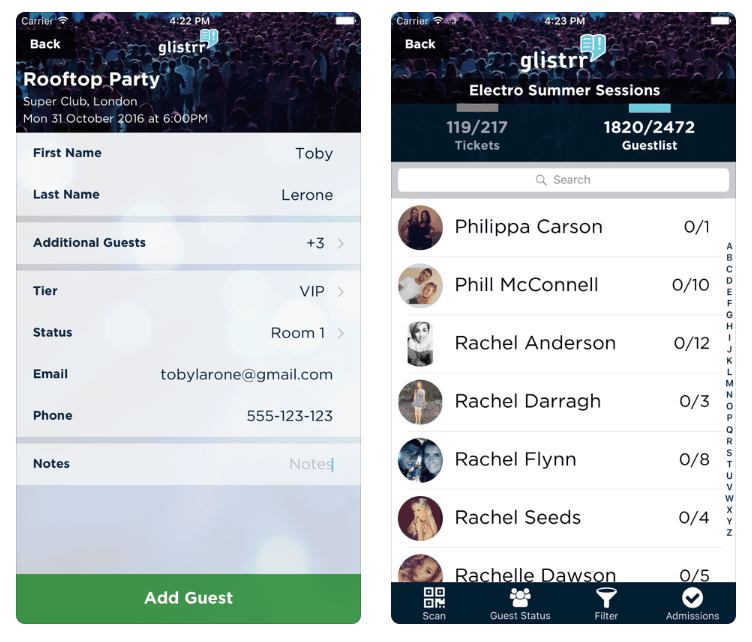
Glistrr is a very popular ticketing management app for concerts and nightlife entertainment events.
Glistrr can handle ticketing for large-scale events ranging from 500 to 10,000 attendees — everything from front-end and back-end event planning to ticket sales and check-in. Notably, Glistrr can also connect with POS terminals, making the payment process very convenient.
Additionally, Glistrr can directly link to social media platforms like Facebook and Twitter, enabling you to market through social channels. For customer support, Glistrr provides user manuals, online courses, and one-on-one training for teams new to using Glistrr.
User Feedback:
Pros: “This is an amazing app. Since we started using Glistrr, our revenue has seen tremendous growth, and I hope this trend continues. We found the Facebook integration especially useful, as customers can register for events directly through Facebook. Glistrr is an app you won’t want your competitors to know about.”
Cons: “The app frequently becomes unresponsive! This happens often on both Android and iOS versions.”
Pricing:
Glistrr offers a free version, along with several paid plans available on the Glistrr website.
Ratings:
On the Google Play Store, Glistrr received a 3.5/5 star rating, with 80% of users having a positive experience and willing to recommend it to others.
Value: ★★★⬖☆ 3.5 Features: ★★★☆☆ 3.3 Ease of Use: ★★★⬖☆ 3.4 Support: ★★★★☆ 3.4
6. Splash
( Available on iOS and Android )
Key Features:
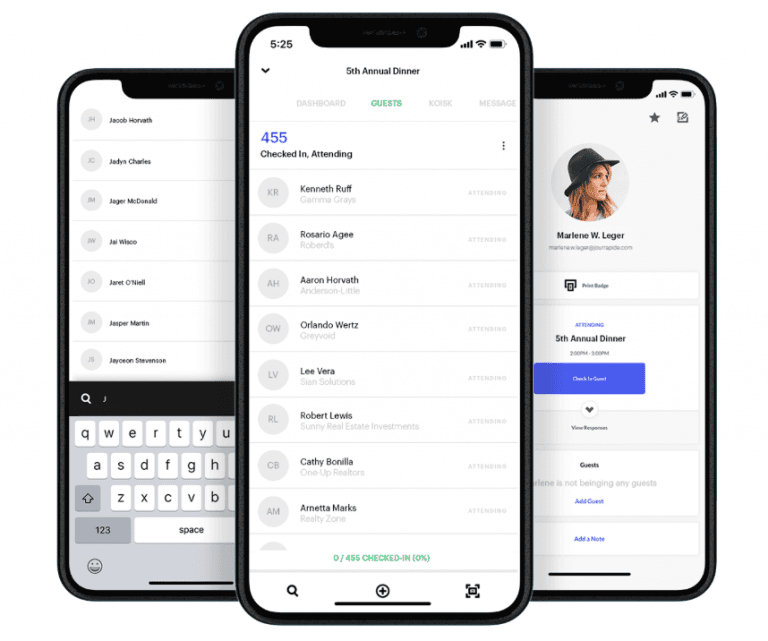
Splash is an event management app suited for personal events and small, non-recurring gatherings (such as birthday parties or informal get-togethers). You can build event pages on Splash and use its built-in event management features for data collection, promotion, and performance analysis. For physical events, you can also set up an attendance management system through Splash. Additionally, Splash provides technical documentation, online meetings, and one-on-one training — similar to Certain, it offers dedicated onboarding for teams using the platform.
User Feedback:
Pros: “I really love this app! It saves organizers so much time. Even when I’m swamped on event day, I can use it to let guests check in quickly.” Cons: “It occasionally freezes on Windows systems, but on a stable Mac, both its stability and user interface are praiseworthy. That said, if you don’t have web design experience or lack creativity, using this app can be a bit tricky.”
Pricing:
Splash currently offers two plans — in addition to the free version, there’s an enterprise plan for companies or larger event teams. You can check the differences here.
Ratings:
On software site Capterra, Splash received a 4.7/5 star rating, with over 95% of users having a positive experience and willing to recommend it to others.
Value: ★★★★⬖ 4.5 Features: ★★★★⬖ 4.5 Ease of Use: ★★★★★ 4.8 Support: ★★★★⬖ 4.7
5. Zkipster
( Available on iOS and Android )
Key Features:
Zkipster is an app suitable for managing multiple events simultaneously.
You can quickly create new events using Zkipster’s templates. Beyond event management, Zkipster also lets users create unlimited RSVP emails and survey forms — again using templates for fast setup. You can also customize your own templates on Zkipster to meet your event’s design needs.
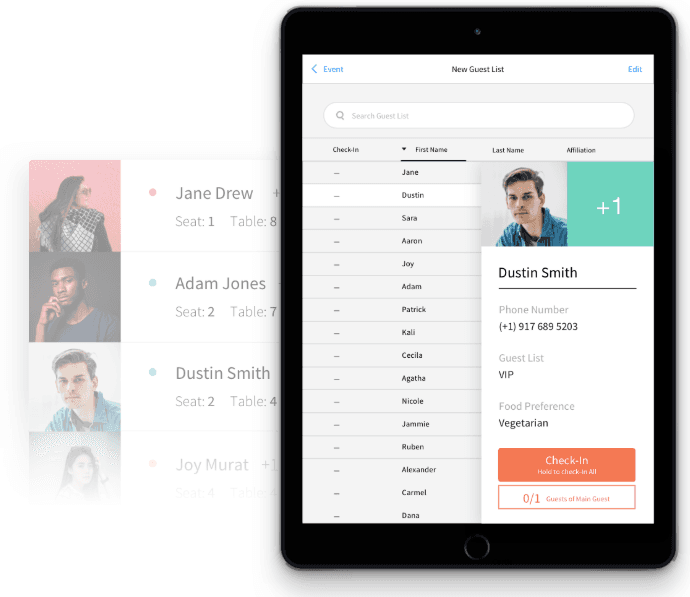
Zkipster is also well-suited as a management tool for large-scale events. You can build guest lists, design seating charts, and manage attendance on Zkipster. With robust security and reliability guarantees, many major events (such as those by HBO, Red Bull, and Saks Fifth Avenue) use Zkipster as their event management tool.
User Feedback:
Pros: “I really like the templates Zkipster provides — you can quickly create your own content with them. If you see a format you like in someone else’s form, you can also copy it directly to your own via Zkipster. Plus, when you add a recipient, Zkipster automatically sends them the email, avoiding the awkward situation of forgetting to hit the send button.” Cons: “I wish Zkipster offered more RSVP options beyond just ‘Attending’ or ‘Not Attending’. For instance, adding an ‘Interested’ option so invitees who are unsure can indicate tentative interest.”
Pricing:
Zkipster does not offer a free version; the most basic plan starts at $199/month. You can find more pricing and plan details on the official website.
Ratings:
On app review site Getapp, Zkipster received a 4.7/5 star rating, with over 95% of users having a positive experience and willing to recommend it to others.
Value: ★★★★⬖ 4.5 Features: ★★★★⬖ 4.7 Ease of Use: ★★★★★ 4.8 Support: ★★★★★ 4.8
4. Attendium

( Available on iOS and Android )
Key Features:
Attendium is an app that can manage multiple events simultaneously, well-suited for events with significant peak periods in attendance (such as events that are packed on weekends and holidays).
Attendium provides the ability to import Excel spreadsheets and export attendee data. If your event encounters network issues, these offline files can help organizers keep the event running smoothly.
Additionally, Attendium can connect with social media platforms like Facebook, allowing potential attendees to discover and register for your event through social channels.
User Feedback:
Pros: “I really like Attendium’s clean and simple interface — it makes everything much easier.” Cons: “The mobile app’s functionality is still incomplete — it can only handle check-in and adding clients. Event planning and design requires using the web version.”
Pricing:
Attendium’s free version supports events with up to 50 attendees and 5 management devices. Various paid subscription plans are also available. You can find more information on the official pricing page.
Ratings:
On the Google Play Store, Attendium received a 4.0/5 star rating, with over 87% of users having a positive experience and willing to recommend it to others.
Value: ★★★⬖☆ 3.5 Features: ★★★⬖☆ 3.7 Ease of Use: ★★★⬖☆ 3.5 Support: ★★★★☆ 3.9
Click here to see the most recommended event management apps for 2022
3. Guest Manager

( Available on iOS only )
Key Features:
Guest Manager’s ticketing management features are truly impressive. You can use a mobile device to import attendee information directly from spreadsheets or e-tickets. Even in the midst of a busy event, you can quickly verify attendees as they arrive. Beyond ticketing management, Guest Manager is also a capable event management app — you can create RSVP email invitations, collect event data and analytics, and more.
User Feedback:
Pros: “Guest Manager is a feature-packed app that meets nearly every ticketing management need. It also offers high-quality customization services. On top of that, Guest Manager has friendly support staff who can assist with cross-device connection issues.” Cons: “Guest Manager’s user interface takes some time to get used to. Finding the right feature combination among so many options can be a challenge.”
Pricing:
According to software site Capterra, Guest Manager does not offer a free plan; the most basic plan starts at $49/month (approx. 1,500 TWD). However, first-time users are offered a free trial.
Ratings:
On Capterra, Guest Manager received a 4/5 star rating, with over 90% of users having a positive experience and willing to recommend it to others.
Value: ★★★★☆ 4.0 Features: ★★★★☆ 4.0 Ease of Use: ★★★★☆ 4.0 Support: ★★★★★ 5.0
2. Sched
( Available on iOS and Android )
Key Features:
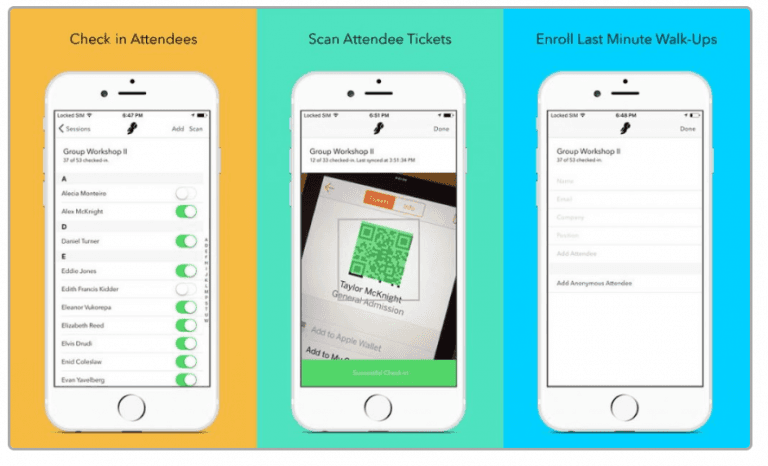
Sched is a powerful, comprehensive event management app — you can even use it as a mini collaboration platform. It provides planning and management features for every stage of an event, before, during, and after, enabling your team to run an entire event on Sched. Sched is especially well-suited for events with multiple ticket options, such as Saturday tickets, Sunday tickets, two-day passes, two-day bundled passes, or single tickets that offer different redemption options (for example, multi-day music festivals or point-based vouchers). In these scenarios, Sched allows attendees to plan their event experience in advance.
However, it’s worth noting that Sched is not ideal for year-round recurring events with little variation (such as weekly fixed-schedule classes). Additionally, Sched can connect directly with Eventbrite — if you’re already using Eventbrite, all data you create on Sched can sync to Eventbrite.
User Feedback:
Pros: “I really like Sched’s interface. The segmentation feature is very useful — you can apply different management approaches to different sections. There’s also a feature to group attendees, allowing you to send different emails and organize meetings based on different groups. Beyond attendee management, Sched can also handle sponsor and guest management.” Cons: “This is a relatively lesser-known management tool. It may take some time to get familiar with it and find practical use cases, but once you start using the app formally, its suite of automation features can dramatically simplify your event management workload.”
Pricing:
Sched offers three pricing tiers, ranging from $500 to $2,500, and does not have a free version. You can find more information here.
Ratings:
On software site Capterra, Sched received a 4.6/5 star rating, with over 90% of users having a positive experience and willing to recommend it to others.
Value: ★★★★☆ 4.0 Features: ★★★★☆ 4.0 Ease of Use: ★★★★☆ 4.0 Support: ★★★★★ 5.0
1. EventX
( Available on iOS and Android )
Key Features:
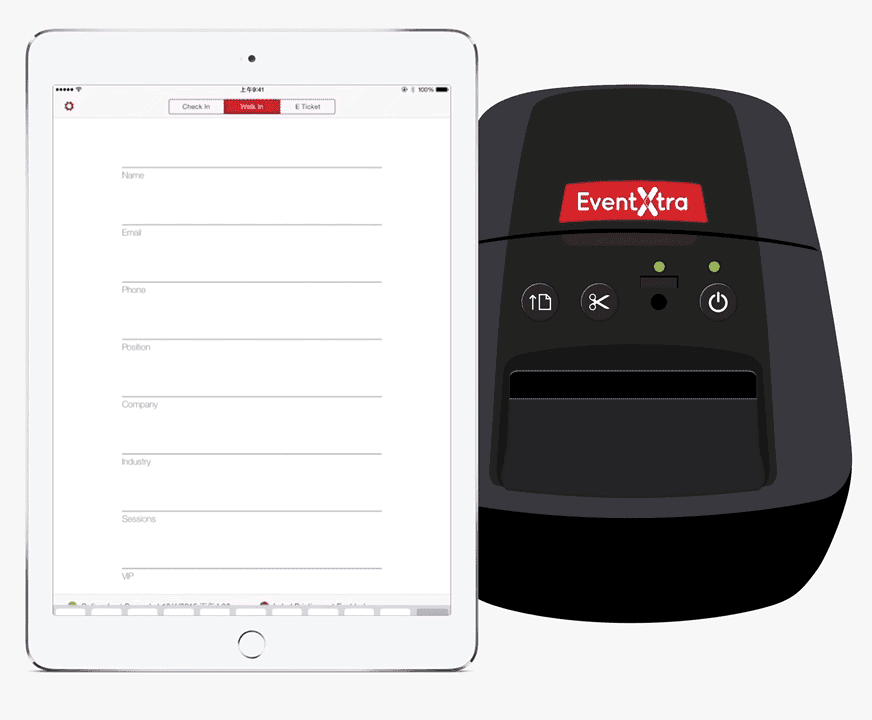
EventX, formerly known as EventXtra, offers an exceptionally powerful check-in experience. The app provides 4 ways to check in: facial recognition, name search, QR code check-in, and direct check-in. Additionally, EventX offers self-service kiosk check-in and VIP notifications, which can instantly alert your event team when a VIP guest arrives. EventX also provides real-time badge printing — you can print attendee badges right at the moment of check-in, and even add your company logo or other customized information to these badges.
User Feedback:
Pros: “EventX offers a comprehensive event solution, from event registration to notifying attendees, on-site check-in, badge printing, data collection, and analytical reports — EventX has truly saved me from so many complex tasks.” Cons: “EventX’s capabilities become most evident when your event exceeds 50 attendees.”
Pricing:
EventX offers a free version for events with up to 50 attendees. Other paid plans can be found here.
Ratings:
On software site Capterra, EventX received a 5/5 star rating, with 100% of users having a positive experience and willing to recommend it to others.
Value: ★★★★☆ 4.0 Features: ★★★★★ 5.0 Ease of Use: ★★★★★ 5.0 Support: ★★★★★ 5.0
Try EventX for Your Next Event
Q&A
Q: What is an event ticketing management app? A: A ticketing management app allows event attendees to enter their personal information, automatically aggregates attendee data, enables event teams to access and organize attendee information, manages attendance through the app, and reminds attendees of the event schedule.
Q: Why do we need an event ticketing management app? A: There are many reasons to use a ticketing management app. Some of them include: tracking event attendance, ensuring that registrants show up on time, making sure attendees don’t leave unexpectedly, and preventing unauthorized individuals from entering the event.
Q: How much does a ticketing management app cost? A: Different ticketing management apps have different pricing models, which typically vary based on the event format and the services the app provides. Popular ticketing management apps usually charge fees and rarely offer free plans.
Conclusion
Ticketing management apps are a vital part of physical events. They can greatly reduce the time and effort involved, allowing event teams to focus their energy on other tasks.

And among all ticketing management apps, EventX delivers the best performance.
Beyond ticketing management, EventX also offers a comprehensive virtual event solution that helps you host global online events across time zones. If you’re interested in our solutions or want to learn more about event strategies, feel free to contact us at EventX!
Further Reading: How We Build Global Online Events
Interested in Our Products?
Looking to create more business opportunities through events? Want to attract more visitors to your event? EventX excels in all types of hybrid, physical, or online event solutions — contact us now for a free trial!